Well recently while posting images on blogger I faced image color
changing issue that seemed like images are automatically changing their
colors when they are uploaded in your blogger posts, well now that's not
that bad as sometimes images are enhanced in a nice way but sometimes I
saw color being DE-saturated and that looked really bad. So when I made
a search on google that why it started happening and if I was the only
one facing that problem, but unfortunately I end up in the google forums
where many blogger's have complained about this same and some good
blogs have already posted a nice trick to disable this effect.

So what we are going to do, is disable this feature and revert to normal image uploading without any image enhancing tweak acting on images.
Now if you think that the image enhancement was little more awesome then the normal image then you can anytime enabled it once again and your images will be enhance automatically, so guys have fun and if you face any problem do comment below.

What Causes this Problem ?
Well this is not a blogger fault but Google+ is doing these mischievous activities, so your blogger account is connected to the Google+ account and its automatically enhancing the images those are uploaded on its server. So from its part it's a plus feature but we all blogger's are not getting much from this feature.So what we are going to do, is disable this feature and revert to normal image uploading without any image enhancing tweak acting on images.
How to Disable Google+ Image Enhancing Feature
So yes now we will see how to exactly disable this feature and get all the future images uploaded in the normal way we are uploading. So now lets see how to disable this feature in google+ settings.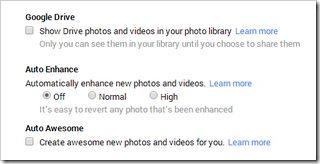 Visit Google+ Settings Page.
 Visit
Visit - Now scroll down till you see Photos and Videos, under that you will see the Auto Enhance option just mark it as "OFF"
Now if you think that the image enhancement was little more awesome then the normal image then you can anytime enabled it once again and your images will be enhance automatically, so guys have fun and if you face any problem do comment below.
Post a Comment